Crosslisting in Canvas
By default, if a course has multiple sections within its Canvas course shell (likely due to cross listing), then faculty will need to navigate between those sections in aPlus+ to collect attendance separately per section. This includes having to run seperate codes for each section if using the self registration option.
This is usually fine if those sections are meeting at different times.
To navigate between sections in aPlus+, the Section dropdown is used

If all sections meet at the same time and in the same place, however, then you may wish to merge the sections so that faculty do not need to navigate between sections. This can be achieved by entering the Attendance Settings screen, and modifying the "Merge Multiple Sections into one" setting.
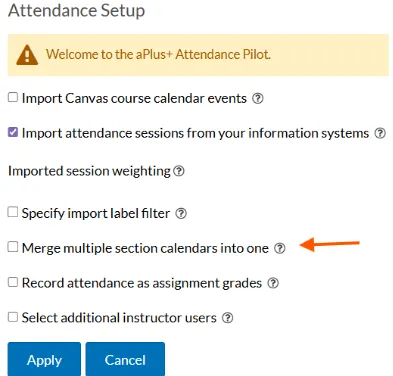
It is important that this occurs prior to any attendance being collected. If it is changed after attendance has been collected, then there is a manual step needed to migrate attendance over to the new, merged, timetable in aPlus. That process is outlined in the two guides:
If using an imported schedule:
If using a manually created schedule: